Firebird Server Health Check & Backup Monitoring
(German-language version below)
Professional baseline assessment and ongoing monitoring for Firebird 2.x-5.x – now also available for in-house or externally sourced hardware
Reliable Firebird server operation does not depend solely on the hardware used. It is also crucial to have properly configured backups, effective restore processes, a clear server configuration, and regular monitoring of key system parameters.
Until now, this service package was only available if the server hardware was purchased directly from us. It is now also available to customers who already own their hardware or purchase it from another supplier.
For a flat fee of EUR 1,750 / USD 1,990 you will receive a service package valid for 3 years.
Initial session: Assessment of the current situation
Once the order has been placed, we will hold an initial remote session together with you. During this kick-off session, we will assess your existing server and Firebird environment and review the current technical situation.
The focus is primarily on the following points:
- Review of the existing backup automation
- Monitoring of automatic restore processes
- Identification of existing errors or vulnerabilities
- Review of existing changes to firebird.conf
- Implementation of a benchmark to assess server performance
The aim is to ensure, right from the start, that the key foundations for reliable Firebird operation are in place.
Backup monitoring using an automated IBEBlock script 
A backup is only genuinely useful if it is created regularly and also checked for technical issues. That is why we implement an automated IBEBlock script to monitor the ongoing backups.
The results are recorded centrally in a log. This allows errors to be identified at an early stage, before they become a real problem in an emergency. Monitoring therefore serves not only as a means of control, but above all for the early detection of errors.

Benchmarking and evaluation of server speed
As part of the initial analysis, we also carry out a benchmark test. This provides you with a practical assessment of the server’s overall performance, enabling you to better judge whether your existing hardware is adequately configured for your Firebird installation.
Analysis of existing Firebird configurations
If your software vendor has already made adjustments to the firebird.conf file, we will assess these as well. In doing so, we will check whether the changes are justifiable and sensible, or whether they could pose potential risks to stability, performance or maintainability.
Quarterly basic checks via remote session

We carry out quarterly baseline checks throughout the three-year period. These are conducted via remote access.
We will send you an email before each check. You can then invite us to a session using the remote access software of your choice. This means you retain control over access at all times and can decide for yourself when and which tool to use to establish the connection.
Price and duration
EUR 1,750 / USD 1,990 for 3 years
This includes the initial kick-off session, the setup of backup monitoring, an assessment of the existing Firebird environment, a server benchmark, and quarterly remote health checks throughout the project duration.
Response times and optional emergency service
The IBExpert RemoteDBA Standard Service is designed as a preventive health check and monitoring service and does not include a 24/7 emergency service.
In the event of a malfunction, our standard service offers a response time on the next working day during our regular business hours from Monday–Thursday 8.00 am - 4.00 pm and Friday 8.00 am - 2.00 pm (Central European Time).
An extended 24/7/365 emergency service can be added as an option for an additional charge (100%). Alerts are sent via Signal Messenger. For this additional service, we guarantee a maximum response time of 4 hours.
The response time refers to the point at which we begin to respond to or investigate the issue, not a guarantee that the problem will be fully resolved within that timeframe.
You can place an order by email to register@ibexpert.net.

Firebird Server Health Check & Backup Monitoring
Professionelle Basisprüfung und laufende Kontrolle für Firebird 2.x-5.x – jetzt auch für eigene oder fremdbeschaffte Hardware
Ein stabiler Firebird-Serverbetrieb hängt nicht nur von der eingesetzten Hardware ab. Entscheidend sind auch korrekt eingerichtete Backups, funktionierende Restore-Prozesse, eine nachvollziehbare Serverkonfiguration und eine regelmäßige Kontrolle der wichtigsten Systemparameter.
Bisher wurde dieses Servicepaket nur angeboten, wenn die Server-Hardware direkt über uns bezogen wurde. Ab sofort steht es auch Kunden zur Verfügung, die ihre Hardware bereits besitzen oder diese bei einem anderen Anbieter kaufen.
Für einen Pauschalbetrag von 1.750 € / 1.990 USD erhalten Sie ein Servicepaket mit einer Laufzeit von 3 Jahren.
Startsession: Aufnahme der Ist-Situation
Nach Auftragserteilung führen wir gemeinsam mit Ihnen eine erste Remote-Sitzung durch. In dieser Startsession erfassen wir die vorhandene Server- und Firebird-Umgebung und prüfen die aktuelle technische Ausgangssituation.
Dabei liegt der Schwerpunkt insbesondere auf folgenden Punkten:
- Prüfung der bestehenden Backup-Automatisierung
- Kontrolle der automatischen Restore-Prozesse
- Erkennung bereits sichtbarer Fehler oder Schwachstellen
- Bewertung vorhandener Änderungen an der firebird.conf
- Durchführung eines Benchmarks zur Einschätzung der Serverleistung
Ziel ist es, schon zu Beginn sicherzustellen, dass die wichtigsten Grundlagen für einen zuverlässigen Firebird-Betrieb vorhanden sind.
Backup-Überwachung mit automatisiertem IBEBlock-Script
Ein funktionierendes Backup ist nur dann wirklich hilfreich, wenn es regelmäßig erstellt und auch technisch überprüft wird. Deshalb richten wir ein automatisiertes IBEBlock-Script ein, mit dem die laufenden Backups überwacht werden.
Die Ergebnisse werden zentral als Log erfasst. So lassen sich Fehler frühzeitig erkennen, bevor sie im Ernstfall zu einem echten Problem werden. Die Überwachung dient damit nicht nur der Kontrolle, sondern vor allem der präventiven Fehlererkennung.
Benchmark und Bewertung der Servergeschwindigkeit
Im Rahmen der Startanalyse führen wir außerdem einen Benchmark durch. Dadurch erhalten Sie eine praxisnahe Einschätzung der generellen Servergeschwindigkeit und können besser beurteilen, ob die vorhandene Hardware für Ihre Firebird-Installation angemessen dimensioniert ist.
Prüfung vorhandener Firebird-Konfigurationen
Falls Ihr Softwarehersteller bereits Anpassungen an der firebird.conf vorgenommen hat, bewerten wir diese ebenfalls. Dabei prüfen wir, ob die Änderungen nachvollziehbar und sinnvoll sind oder ob daraus mögliche Risiken für Stabilität, Performance oder Wartbarkeit entstehen können.
Vierteljährliche Basischecks per Remote-Sitzung
Während der gesamten Laufzeit von 3 Jahren führen wir vierteljährliche Basischecks durch. Diese erfolgen per Remote-Einwahl.
Vor jedem Check senden wir Ihnen eine E-Mail. Anschließend laden Sie uns mit einer Remote-Zugangssoftware Ihrer Wahl zu einer Sitzung ein. Sie behalten damit jederzeit die Kontrolle über den Zugriff und entscheiden selbst, wann und mit welchem Tool die Verbindung hergestellt wird.
Preis und Laufzeit
Der Pauschalpreis für das komplette Servicepaket beträgt:
1.750 € / 1.990 USD für 3 Jahre
Enthalten sind die initiale Startsession, die Einrichtung der Backup-Überwachung, die Bewertung der vorhandenen Firebird-Umgebung, ein Server-Benchmark sowie die vierteljährlichen Remote-Basischecks während der Laufzeit.
Reaktionszeiten und optionaler Emergency-Service
Der IBExpert RemoteDBA Standard Service ist als präventiver Health-Check- und Monitoring-Service ausgelegt und beinhaltet keinen 24/7-Emergency-Service.
Im Fehlerfall gilt für den Standardservice eine Reaktionszeit am nächsten Arbeitstag während unserer regulären Geschäftszeiten Montag-Donnerstag 8:00 - 16:00 und Freitag 8:00 - 14:00 (Mitteleuropäische Zeit).
Optional kann ein erweiterter 24/7/365 Emergency-Service gegen Aufpreis (100%) hinzugebucht werden. Die Alarmierung erfolgt dabei über den Signal Messenger. Für diesen Zusatzservice stellen wir eine maximale Reaktionszeit von 4 Stunden sicher.
Die Reaktionszeit beschreibt den Beginn der Kontaktaufnahme bzw. Analyse, nicht eine garantierte vollständige Fehlerbehebung innerhalb dieses Zeitraums.
Bestellen können Sie formlos per E-Mail an register@ibexpert.net.
IBExpertDemoDB
Use the IBExpertDemoDB for benchmark testing. The UDFs and SQLs necessary to generate the demo database can be found in the IBExpert Developer Studio's /IBExpertDemoDB directory. The documentation lists the simple steps needed to generate a demo database to the size of your choice.
The IBExpert Benchmarks article illustrates in detail how to utilize this valuable function as a sample web shop.
In the subdirectory, \IBExpertDemoDB, you will find a script, db1_30.sql, which you an use to create a Firebird 3.0 database. Among other things this includes a Soundex function as a stored procedure, as a stored function and as a package. By these means you can create your own functions in Firebird 3.0 or using your own UDF, and use them in SQL as if they were an internal function.
Furthermore there is a basic implementation for a materialized view alternative in this script, which can also be used with older Firebird versions.
By combining a view with a static table it is possible to avoid calculating complex result sets each and every time, and only recalculate them following expiry of specified time intervals.
IBExpert Distribution OEM Edition
The IBExpert Distribution OEM Edition allows unlimited distribution of the purchased IBExpert IDE software file or IBExpert scripts with your application for a period of 5 years.
You will receive an IBExpert.exe, IBEScript.exe and/or IBEScript.dll file created exclusively for your company, which you may use on any of your customers' computers on which your software is running, but also on any computer belonging to your group of companies (purchase, rental, leasing). However, distribution beyond this is explicitly prohibited. Employees who no longer work in your company may no longer use this software and may not continue to use it. You are responsible for ensuring that the OEM is only used in accordance with the conditions agreed between IBExpert and you (IBExpert contractual partner) and you must ensure that no arbitrarily available tool is distributed for activation. The OEM Edition may continue to be used on computers, where it has already been installed, for an unlimited period of time. For new installations however, a new IBExpert Distribution OEM must be purchased for the respective module after 5 years.
Updates are not included and must be commissioned additionally.
The OEM Update Subscription provides you access to all updates for 60 months (12 months on request).
The OEM Update Subscription cannot be ordered retrospectively, but only as an extension when directly ordering an IBExpert Distribution OEM Edition and is charged in advance.
Prices/Modules
IBExpert Distribution OEM Edition IDE
Software file: IBExpert.exe EUR 14,095
OEM Update Subscription 60 months: EUR 17,635
OEM Update Subscription per 12 months prepaid: EUR 4,645
IBExpert Distribution OEM Edition Script
Software file: IBEScript.exe: EUR 14,095
OEM Update Subscription 60 months: EUR 17,635
OEM Update Subscription per 12 months prepaid: EUR 4,645
IBExpert Distribution OEM Edition DLL
Software file: IBEScript.dll: EUR 14,095
OEM Update Subscription 60 months: EUR 17,635
OEM Update Subscription per 12 months prepaid: EUR 4,645
If no OEM Update Subscription is ordered as an extension to the IBExpert Distribution OEM Edition or the annual subscription period has been interrupted, the OEM Update Subscription cannot be ordered retrospectively.
We then charge a flat-rate service fee of currently EUR 4,645 per update for the respective OEM module.
The registration code (a character string to be calculated on the basis of the computer) does not require any internet access, portal access or access from third parties.
The IBExpert Distribution OEM Edition includes an individualised DLL or EXE with the name of the IBExpert contract partner.
On each computer on which an OEM DLL or EXE is to be used, the OEM licensee must calculate a registry entry in accordance with our specifications and save it in the HKCU area before using the OEM EXE or DLL.
Before using the OEM EXE or DLL, the OEM licensee must save it in the registry in the HKCU area.
The registration entry is calculated and checked individually, based on the local computer name.
Hardware changes or deployment on virtual machines do not change the code if the selected computer name does not change in the process.
The registration entry must be generated by the end customer's licensed software and not by separate software that can also be used without the correct licensing.
You will receive a source code sample as an example for this procedure as part of the OEM package.
Client library is missing or invalid
Even if you are using a 64-bit version of Firebird, you will need to use a 32-bit client library, because IBExpert is a 32-bit application. If you accidentally specify a 64-bit client library, you will get this error message:
If you require further assistance, we can support you with our IBExpert & Firebird Hotline
Disclaimer
Legal notice / Disclaimer
1. Content
IBExpert Ltd does not accept liability for the topicality, accuracy, completeness or quality of the information and material provided unless the mistake occurred intentionally or through gross negligence. This refers to any loss, additional costs or damage of any kind suffered as a result of any use of any information and material IBExpert Ltd provides on its web sites. All offers are not binding and without obligation.
2. Referrals and links
IBExpert Ltd has no influence on the design and contents of third party material linked or referred to from its web sites. Therefore, IBExpert Ltd expressly distances itself from such kind of material and rejects responsibility for any contents provided by third parties - unless it has full knowledge of illegal contents and would be able to prevent the visitors of its web sites from viewing those pages.
3. Copyright
The layout of the web sites, diagrams, pictures and logos used and the collection of individual contributions are protected by copyright. Any duplication or use of objects such as diagrams, pictures or texts in other electronic or printed publications is not permitted without IBExpert Ltd's explicit agreement.
4. Legal validity of this disclaimer
This disclaimer is to be regarded as part of the internet publication which you were referred from. If any of the terms and conditions should be determined invalid by reason of the relevant laws then the remaining terms and conditions remain uninfluenced by this fact.
Where Is Your Database Really Spending Its Time?
Have you ever investigated which SQL statements are unexpectedly slowing down your database?
With the IBExpert Full Version or Day Edition, you can see what is happening directly on the Firebird server. Simply right-click your registered database, select Start trace session, and enable tracing for your current connection. You can then follow statement preparation and execution, stored procedure calls, and trigger activity as they happen.
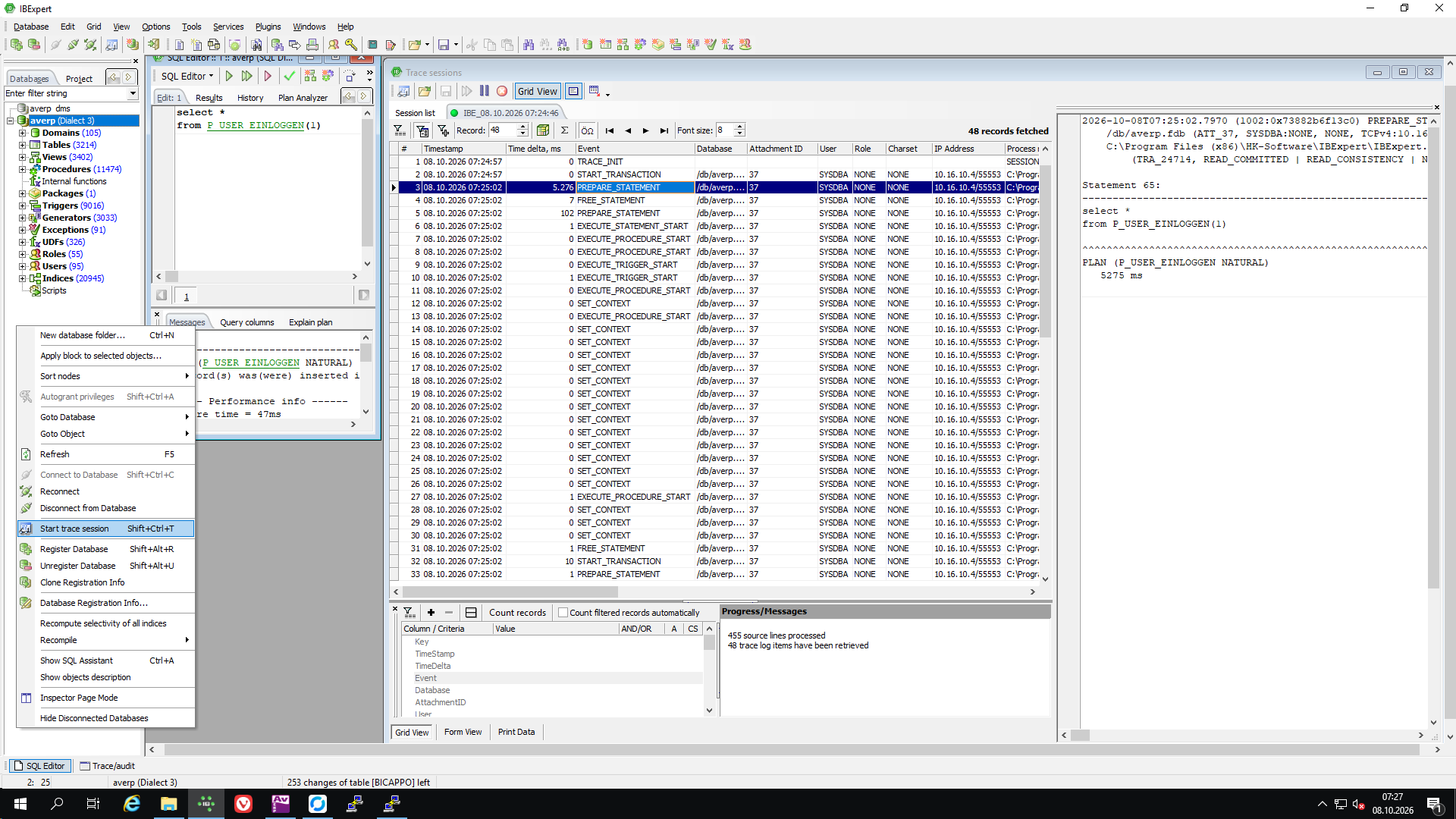
In the example shown, the seemingly unremarkable stored procedure P_USER_EINLOGGEN takes more than five seconds just to prepare the call, before execution even begins. A simple-looking SQL statement can hide a surprising amount of work.
These detailed trace results also give AI platforms the evidence they need to help you investigate performance problems and suggest targeted improvements. Without tools that reveal what the server actually does, even AI-assisted optimisation can quickly reach a dead end: the SQL text alone often does not explain where the time goes.
During our IBExpert Hotline Sessions, we can investigate these delays together, identify unexpected calls and dependency chains, explain why they occur, and work on ways to optimise your database.
Bring your trace results, and let’s find out where the time really goes.